
Live Demo
We built a complete application to show what confidential tokens look like in practice. It connects to Arbitrum Sepolia testnet and lets you wrap, transfer, and manage confidential tokens, all from your browser.
Try the Demo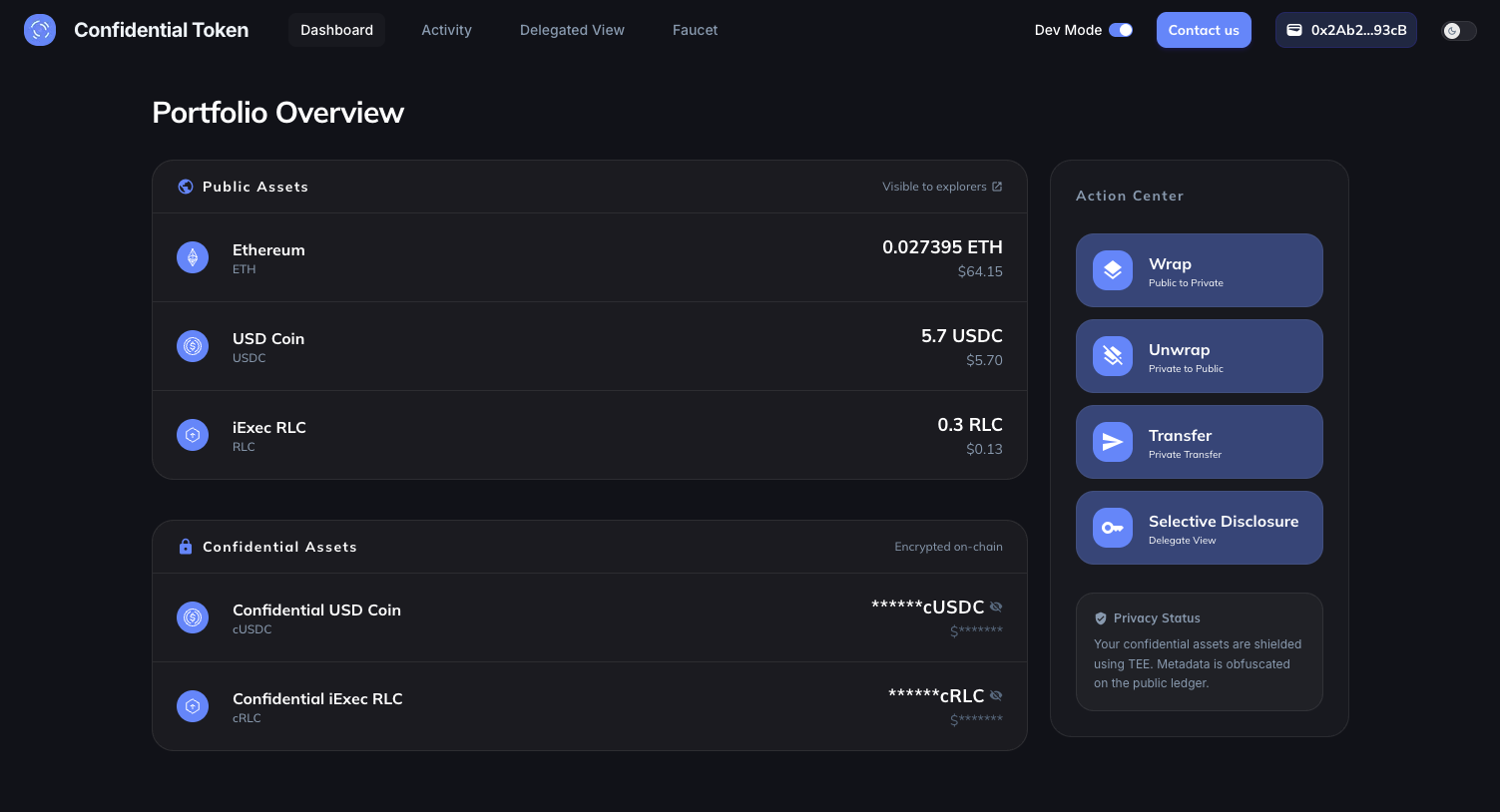
What the demo covers
The application walks through four core capabilities of confidential tokens:
| Feature | What it does |
|---|---|
| Wrap | Convert a public ERC-20 token (USDC, RLC) into its confidential equivalent (cUSDC, cRLC) |
| Transfer | Send confidential tokens to another address. The amount stays encrypted on-chain |
| Unwrap | Convert a confidential token back into a standard ERC-20 |
| Selective Disclosure | Grant a third party (auditor, regulator) read access to your confidential balance |
Prerequisites
To use the demo you need:
- A browser wallet (MetaMask, Rabby, Coinbase Wallet…)
- A small amount of Arbitrum Sepolia ETH for gas fees
- Some testnet tokens to wrap. The app includes a faucet to get USDC and RLC
No real funds involved
The demo runs entirely on Arbitrum Sepolia (testnet). All tokens are free and have no monetary value.
Walkthrough
1. Connect and get testnet tokens
Open the app and connect your wallet. If your portfolio is empty, click Faucet to receive free testnet ETH, USDC, or RLC. These are the public tokens you'll wrap into their confidential versions.
2. Wrap tokens
Select a token (for example USDC) and choose an amount. The wrapping process happens in two steps:
- Approve authorize the confidential token contract to spend your ERC-20
- Wrap lock the ERC-20 and mint the equivalent confidential token (cUSDC)
Once confirmed, your dashboard shows the new confidential balance. Notice that it appears as an encrypted handle. Click it to decrypt and reveal the amount. Only you can do this.
3. Transfer confidentially
This is where things get interesting. Select a confidential token, enter a recipient address and an amount. Before the transaction is sent, the amount is encrypted client-side using the Nox JS SDK. On-chain, the transaction only contains an encrypted handle. No observer can determine how much was transferred.
The recipient sees a new confidential balance on their end, which they can decrypt with their own wallet.
4. Unwrap tokens
To convert confidential tokens back into standard ERC-20, use the unwrap flow. The process encrypts the amount, calls the confidential contract, then finalizes the release of the underlying ERC-20 tokens to your wallet.
5. Grant selective disclosure
In a regulated context, you may need to prove your holdings to an auditor without exposing everything publicly. The selective disclosure feature lets you grant a specific address read access to your confidential balance.
Enter the viewer's address, choose which tokens to share (or all of them), and confirm. The viewer can then read your balance, but nobody else can.
Per-balance access
Access is tied to the current balance handle. After a transaction that changes your balance (wrap, transfer, unwrap), you need to grant access again for the new balance.
How it works
Under the hood, the demo relies on three building blocks:
- ERC-7984 smart contracts the on-chain standard for confidential tokens, handling wrap, unwrap, and encrypted transfers
- Nox JS SDK encrypts amounts client-side before sending them on-chain, and decrypts balance handles for the wallet owner
- Handle Gateway the off-chain service that manages encryption keys and processes decryption requests inside a Trusted Execution Environment (TEE)
The application never sees plaintext amounts. Encryption happens in the browser, decryption happens inside the TEE, and the smart contract only manipulates encrypted handles.
Activity and audit trail
The Activity page tracks all your operations (wraps, transfers, unwraps, access grants) with timestamps and links to the block explorer. The Delegated View page shows a two-way overview: who you've granted access to, and who has granted access to you.
Next steps
- ERC-7984 Token Learn how to create your own confidential token
- ERC-20 to ERC-7984 Wrap an existing ERC-20 into a confidential token
- Manage Viewers Deep dive into access control for confidential data
- JS SDK Reference for encryption and decryption methods